Every line on a sheet is the result of a calculation; every label is the result of a standard.
At a glance
- Calculations — short-circuit current, voltage drop, ampacity, illuminance — run on one model: plan, diagram, schedule and estimate agree to the last metre and penny.
- Five standards (GOST, IEC 60364, BS 7671, NEC, IS 732) are checks in code.
- 1.16M lines, 76 modules, 20,000+ tests, 34 sha256 reference pages.
- Try it free in the browser: the “House 100 m²” demo at /cad/.
What GorkyCAD is: electrical CAD software that also calculates
GorkyCAD does three things at once. Draws — floor plan, cable routes, panel, single-line diagram. Calculates — short-circuit current, voltage drop, ampacity, illuminance, estimate. Issues — a PDF document set to GOST (SPDS) or IEC 60364 / BS 7671 / NEC / IS 732. The complexity is not in the interface; it is under the hood.
The codebase makes the point: about 1.16 million lines of TypeScript (roughly 760 thousand of them product code, without tests) and 76 modules. Core layers:
| Core layer | Files |
|---|---|
| PDF generator | ≈466 |
| AI core (recognition) | 328 |
| Calculation engines | 203 |
| Drawing import | 200 |
Further down — electrical symbols 161, SVG graphics 111, estimate 99, single-line diagram 93 files.
Complexity #1 — standards: IEC 60364, BS 7671, NEC and IS 732 built into the checks
Standards here are not tooltips — they are a machine-checked canon: every rule lives in code as data with its clause reference, and as a check that can block the export. Two loops run at once: Russian (GOST/SPDS, PUE, SP) and international (IEC 60364, BS 7671, NEC, IS 732).
One normative registry — one book for the whole system
A single normative registry holds 44 facts: 27 verified against the source standard with a quote, and 17 honestly marked project policy. The UI, the PDF and the engines take a rule only from this registry; a blacklist of 61 forbidden pairs records which clause must not be applied to which fact.
| Subsystem | Answers | Scale |
|---|---|---|
| Normative reference registry | “What we cite” | 44 facts (27 verified + 17 policies) |
| QC registry (code checking) | “What is wrong on the sheet” | 69 rules in 15 categories |
| Executable rule engine | “Is the calculation within limits” | RU_PUE and IN_CEA profiles |
The cable-routing canon
Routes read like Manhattan bundles: trunk → branches → drops at 90° — diagonals do not exist by definition of the code. At crossings, the power line stays continuous and the low-current line breaks, per line-type convention. Automation never throws away the engineer's hand-drawn route: it snaps geometry or moves a crossing to the nearest opening.
Complexity #2 — the calculations: short-circuit, load, voltage drop, cable sizing
A calculation in GorkyCAD is one canon across the whole product. The plan, single-line diagram, cable schedule and estimate are four projections of one calculation — that is why they agree.
Short-circuit current and the phase–earth loop
Short-circuit current is computed by one function, called by the screen, the worker, the PDF, the panel sheet and the calculator. This is a cured defect: the same feeder once returned 547 A in one check and 298 A on the panel, because the formula lived in several copies. With one formula, the documents must agree.
The short-circuit calculation had an overstatement of 1.8–3.4× removed: the phase–earth loop is now computed in full (L + N/PE), with heating to 160 °C and contact resistances — per GOST 28249-93 and PUE, ch. 7.1. Where protection previously “passed” falsely, the requirement is now checked honestly.
| Line | Before | After |
|---|---|---|
| Cu 2.5 mm² / 20 m | 767 A | 415 A |
| Cu 6 mm² / 5 m | 4,678 A | 1,392 A |
| Cu 6 mm² / 20 m | 2,500 A | 764 A |
Short-circuit calculation in GorkyCAD. Rows 1–2 — the “PUE calculator” path; row 3 — the “AI hint” path (Ghost H5 case).
Verdict reversal, per canon: a 1.5 mm² / 60 m line on a C16 breaker — before the fix, “ratio 10.1 — passes” (false); after, “6.28 — fails” (honest).
Protection is verified for sensitivity against time–current curves B/C/D matched to the circuit's purpose: lighting gets B, pumps and machines get D, sockets and general loads get C. “Everything C” is not the canon here.
No input — no verdict. A false verdict is worse than no verdict.
Voltage drop (ΔU)
Voltage drop follows one canon, ΔU = k·I·L·(R·cosφ + X·sinφ): resistivity at 70 °C operating temperature, not 20 °C (otherwise ΔU is understated by about 16 %), lengths from real route segments, drop summed along the “feeder → group” cascade. The limits are 3 % for lighting and 5 % for other loads (IEC 60364-5-52). Four ΔU implementations used to exist — now one, watched by a test.
Cable sizing, ampacity and illuminance
Cable sizing is not guesswork: first by ampacity (In ≤ Iz = I_allowable·K1·K2) and coordination with protection, then by voltage drop. Correction factors come strictly from the tables; outside the table the engine returns an honest “not verified”. Aluminium uses its own tables, not “copper × 0.78”. Illuminance is calculated by the utilization-factor method against room-type norms.
Cross-document verification
The same circuit on the plan, the single-line diagram, the cable schedule and the estimate is not four documents — it is four projections of one calculation: every line length from one routing canon, a device rating the same number everywhere (“C25” everywhere). Any divergence is an export-gate error; on the control project “House 100 m²” the check returns zero divergences. No data means “NO DATA”, not a “typical” assumption; no solution means a typed reason, not a filler “2.5 mm²”.
Complexity #3 — the document set: panel schedules, single-line diagrams, cable schedules
The document set is a catalogue of up to 38 sheets: title and site plan, nine plans, panel single-line diagrams, cable schedule, calculation sheets, schedules, specifications and the estimate. The golden reference is 34 pages with a sha256 fingerprint each; separately, 6 pixel SSIM references catch rendering degradation.
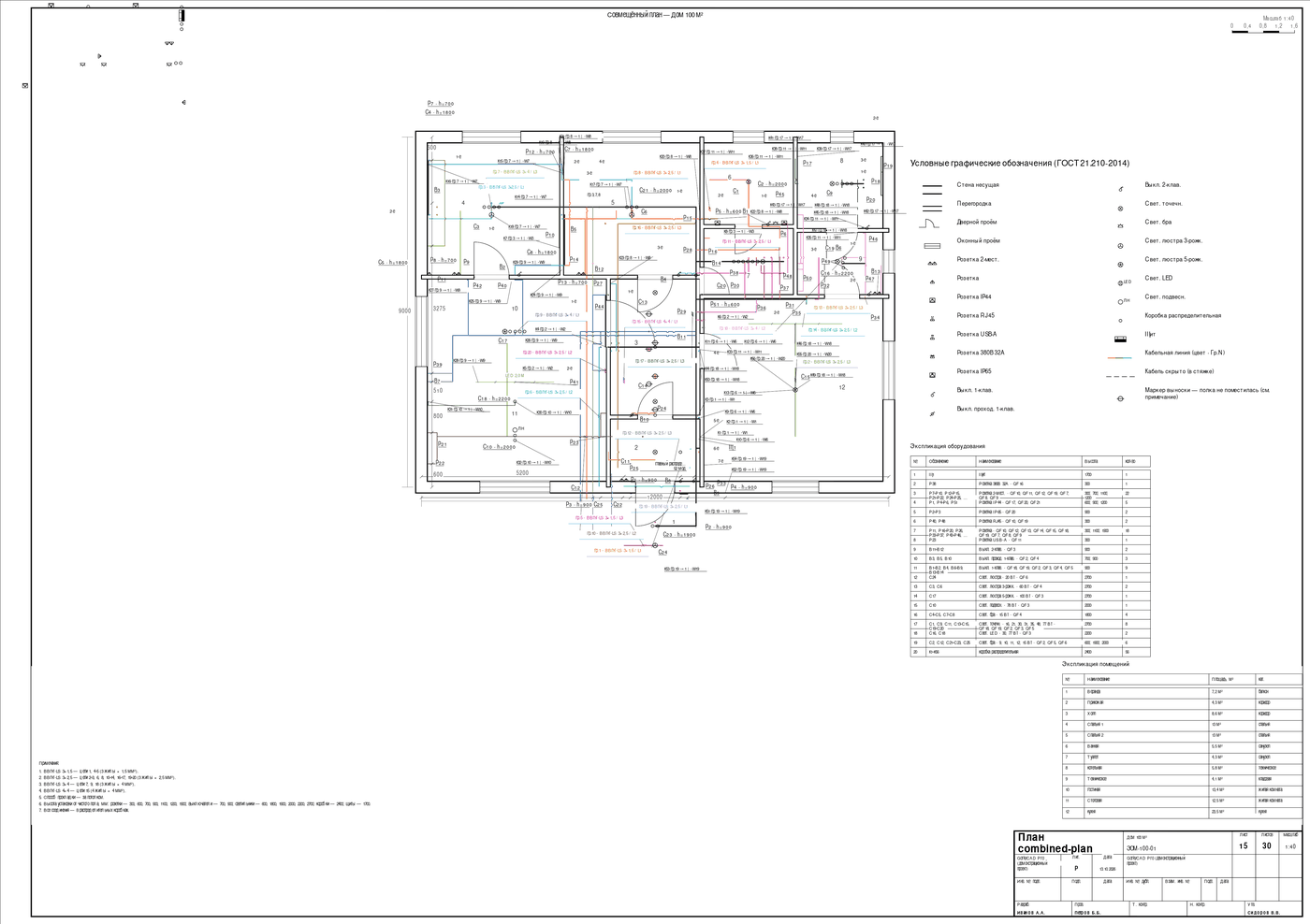
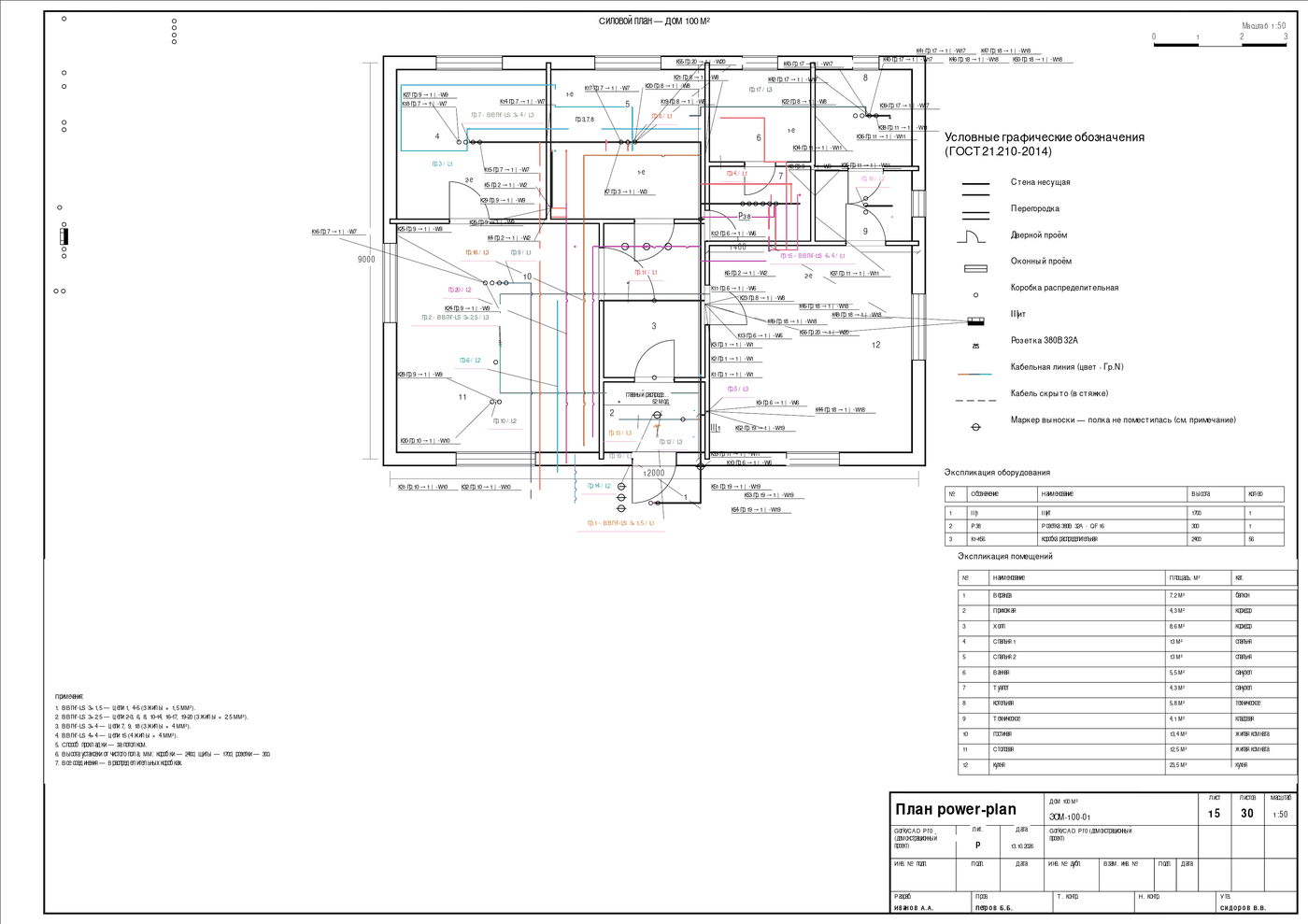
Callouts do not cross walls, dimensions or text
A five-stage engine lays out callouts: goals → clusters (fans) → bands → callout → collision check; on overlap the label is moved, not printed on top, and with no clean spot it goes to the sheet legend. The conflict hierarchy is coded: walls and openings > symbols > connections > dimensions > callouts > text. A cable passes through a wall only in a sleeve, labelled “Ø25 fire-sealed”.
The PDF is byte-for-byte deterministic
The bytes of the same project used to differ between exports: the date came from the system clock and the identifier was random. Now the identifier is a hash of the content and dates come from the model and app version — no Date.now(), no Math.random(): the same document produces bit-identical bytes today, in CI and a year later.
An empty or broken set cannot pass as ready
A sheet passes a chain of checks — completeness, invariants, content, consistency, PDF validation. An empty project (“55 walls, 0 fixtures”) used to be declared ready working documentation; now it is blocked with a reason. A broken PDF aborts the export; an unbuilt sheet becomes an honest “Sheet not built: reason” page.
Complexity #4 — AI import of existing drawings
Importing an existing drawing is its own discipline. The app classifies the file (vector / scan / empty) and reads the scale from the drawing: dimension labels → nearest dimension line → median with outlier rejection. Confidence and sample count are not hidden. The full cycle is in the academy's drawing-import materials.
A pixel cannot be written as a millimetre
A gate blocks pixel units until the “mm per unit” calibration is supplied. An unconfirmed scale blocks both “Assemble project” and the PDF export — and a human confirmation is stamped with a timestamp and author.
Five votes for one socket
A socket is recognised by five “voices” — layer name, legend/symbol table, physical size in millimetres, block repetition and a vision model; every result keeps its provenance. A scan is read by a ladder: free rules → a pool of cheap models by consensus → a strong arbiter only on disagreement; if AI fails, an honest “not recognised”, not garbage. “Assemble project” runs circuits, panel and routes through the same engines as manual work.
How it proves itself: 20,000+ automated tests
Every release passes more than 20,000 automated tests in 2,285 test files: ≈339 for the PDF generator, 102 for the calculation engines, 103 for drawing import. File names: gate, parity, canon, gost, norm, acceptance, invariant.
Gates are standards encoded as checks
The ampacity test demands exactly the table values and returns “not verified” for a non-standard cross-section. The voltage-drop test re-implements the ΔU formula by hand inside the test itself. Reference sheets are compared pixel-wise (SSIM), and the gate checks itself: shift a page by 20 pixels and it must go red.
The debt ratchet and the ban on second sources of truth
Technical debt (as any, duplicated formulas, bloated files) sits on a ratchet: the count is fixed, adding debt turns the build red, reducing it lowers the bar. A separate gate bans new “sources of truth”: no second ampacity table or private ΔU formula outside the canon. Some gates are still bedding in: violations show in logs, merges are not yet blocked.
Before a PDF counts as ready, it passes 19 registered gates, 10 of which block the release, with the rule “a gate error cannot end in readiness”. An unbuilt sheet enters the set as an honest page with a reason. The details are in the product documentation.
One core, five electrical standards
GorkyCAD switches the whole engineering profile, not just labels: one core holds five specifications — GOST (Russian standards, with PUE installation rules), IEC 60364, BS 7671, NEC (NFPA 70) and IS 732/1646 (India) — each with its own frequency, cross-section series, ampacities, phase colours and residual-protection rules. Switching is one click: calculations, colours, sheets and symbols rebuild consistently.
| Parameter | GOST/PUE | IEC 60364 | BS 7671 | NEC (NFPA 70) | IS 732/1646 |
|---|---|---|---|---|---|
| Frequency | 50 Hz | 50 Hz | 50 Hz | 60 Hz | 50 Hz |
| Cross-section series | from 1.5 mm² | from 1.5 mm² | from 1.0 mm² | AWG 18…4/0 | from 1.0 mm² |
| Residual protection | RCD per PUE/SP | RCD 30 mA | as IEC | GFCI 6 mA | as IEC |
| Symbols | GOST 2.755/2.710 | IEC 60617 | BS 3939/1363 | ANSI Y32.9/NEMA | IEC/IS |
AWG and mm² live in one table; NEC defaults to its own units (AWG, feet, inches). The document language freezes for the duration of an export, so switching the UI cannot mix languages in one sheet. Reading symbols across standards is covered in the .
Runs in the browser: electrical CAD for Mac and Linux — no install
GorkyCAD is web-based electrical CAD software: it runs in the browser, so it works on Mac, Linux and Windows with nothing to install. Open the free “House 100 m²” demo at /cad/ and calculate directly in the browser — no local CAD installation required.
Try it yourself
Do not take the article's word for it — open the free demo project “House 100 m²” in the browser: 20 circuits (QF01–QF20) and 349.0 m of cable are already calculated. The demo loads without routes — build them with one “By circuits” click and open the PDF sheets. More design guides are in the GorkyCAD blog.
Open the “House 100 m²” demo →
FAQ
What CAD software do electrical engineers use?
Electrical engineers typically use general-purpose electrical CAD such as AutoCAD Electrical or EPLAN for heavy industrial work, and specialised electrical design software for building projects. GorkyCAD is in the second group: it draws the plan, single-line diagram, cable schedule and estimate, and runs the calculations itself in the browser.
What does GorkyCAD do?
GorkyCAD is electrical CAD software that draws, calculates and issues documentation. It produces the plan, single-line diagram, cable schedule and estimate, calculates short-circuit current, voltage drop, ampacity and illuminance, then exports a PDF document set to IEC 60364 / BS 7671 / NEC / IS 732 or GOST.
Does GorkyCAD work with IEC 60364, BS 7671, NEC and IS 732?
Yes. GorkyCAD ships five electrical profiles in one core — GOST, IEC 60364, BS 7671, NEC (NFPA 70) and IS 732 — each with its own frequency, cross-section series, ampacity tables, phase colours and residual-protection rules. Switching profiles rebuilds calculations, circuit colours, sheets and symbols consistently.
How are short-circuit current and voltage drop calculated?
Short-circuit current uses the phase–earth loop with conductor heating to 160 °C and contact resistances; voltage drop uses ΔU = k·I·L·(R·cosφ + X·sinφ) at the 70 °C operating temperature. One function serves the screen, the PDF and the panel schedule, so every document shows the same number.
How does GorkyCAD size a cable?
By ampacity first (In ≤ Iz, derated by correction factors), then by voltage drop, against the standard cable series. Correction factors come from the tables — outside the table the engine returns “not verified” instead of inventing a number. Aluminium uses its own tables, not “copper × 0.78”.
Does it run on Mac and Linux?
Yes — GorkyCAD runs entirely in the browser, so it works on Mac, Linux and Windows with nothing to install. It is web-based electrical CAD software: open the free demo, calculate short-circuit and voltage drop, and export PDF sheets without installing anything locally.
Is there a free version?
You can try the free demo project “House 100 m²” in the browser — no sign-up. It is already calculated (20 circuits, 349.0 m of cable); routes are built with one “By circuits” click, and the PDF sheets are generated. A straight way to check the calculations on a real project.
Engineering under the hood, order on the sheet.